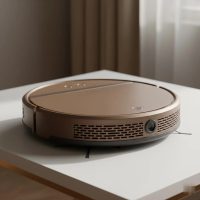
Stepping into the world of smart home cleaning, Dyson robot vacuums promise to bring the brand’s renowned suction power and innovative engineering to autonomous floor care. For years, Dyson has been synonymous with powerful, effective cleaning, and their venture into robotic vacuums aims to translate that legacy into machines that clean your home effortlessly. But what truly sets a Dyson robot vacuum apart, and is it the right choice for your household? Let’s dive into the core technology, features, and future of these intelligent cleaners.
The Heart of the Clean: Dyson’s Core Technology
When you think Dyson, you often think “powerful suction,” and their robot vacuums are no exception. This isn’t just a marketing claim; it’s rooted in specific engineering choices designed to deliver a deep, thorough clean.
What Makes Dyson Robot Vacuums So Powerful?
Dyson’s robot vacuums leverage the same advanced motor technology found in their cordless stick vacuums. At the core is the Dyson Hyperdymium™ motor, which is engineered to spin at incredibly high speeds, generating exceptional suction power. For instance, the Dyson 360 Vis Nav has been lauded for delivering superior suction performance, often doubling that of its closest competitors in rigorous tests. This translates into remarkable pick-up ability across various surfaces, from fine dust on hard floors to embedded dirt in carpets.
Beyond raw power, the brush bar plays a crucial role. Dyson has introduced a unique “triple-action brush bar” in models like the 360 Vis Nav. This innovative design combines a soft roller, ideal for delicate hard floors, with stiff nylon bristles that dig deep into carpets, and anti-static carbon fiber filaments to capture fine dust. This multifaceted approach ensures comprehensive cleaning, adapting to different floor types without missing a beat.
And for those concerned about air quality, Dyson robot vacuums are often equipped with robust, whole-machine HEPA filtration systems. These filters are designed to capture 99.99% of microscopic particles as small as 0.1 microns, including allergens, ensuring cleaner air circulating in your home after each pass.
How Do Dyson Robot Vacuums Navigate Your Home?
Intelligent navigation is paramount for any robot vacuum, and Dyson employs sophisticated systems to map and move through your living space. The Dyson 360 Vis Nav, for example, utilizes a 360° vision system with 26 sensors to understand its environment, allowing it to map your home and navigate intelligently. This means it doesn’t just bounce around; it creates a structured cleaning path, aiming for efficient coverage.
Newer innovations, such as the upcoming Dyson Spot+Scrub AI, take this a step further, integrating dual laser LiDAR navigation and advanced AI stain detection tools. This enables the robot to not only see and map but also to identify different types of dirt and stains, adjusting its cleaning strategy accordingly. It can even re-clean a spot up to 15 times if it detects lingering debris. Plus, it introduces obstacle avoidance capabilities, recognizing and maneuvering around common household items like cables, socks, and toys, which has been a welcome improvement for users.
Key Features and What to Consider
Dyson robot vacuums come packed with features, but understanding them and what they offer is key to making an informed decision.
What Are the Standout Features of Dyson Robot Vacuums?
|
Our Picks for the Best Robot Vacuum in 2026
As an Amazon Associate I earn from qualifying purchases.
|
||
| Num | Product | Action |
|---|---|---|
| 1 | Tikom Robot Vacuum and Mop Combo, 5000Pa Robotic Vacuum Cleaner, 150 Min Max, App & Remote Control, Ideal for Hard Floor, Carpet, Pet Hair, Self-Charge(G8000 Max) |

|
| 2 | ILIFE V5s Plus Robot Vacuum and Mop Combo with Wi-Fi/App/Alexa, Automatic Self-Charging Robotic Vacuum Cleaner, Slim and Quiet, Cleans Hard Floors Carpets and Pet Hair (V5s Pro Upgrade Version) |
|
| 3 | Robot Vacuum and Mop, 3-in-1 Robotic Vacuum Cleaner with 70-Day Self-Emptying Base, 360° LiDAR Navigation, Smart Mapping & Auto-Return, 6000Pa Strong Suction for Pet Hair, Carpets & Hard Floors |
|
| 4 | Bagotte Robot Vacuum and Mop, Robot Vacuum Self Emptying, 5000Pa Powerful Suction, 90-Day Hands-Free, Advanced Smart Mapping, LiDAR Navigation Robotic Vacuum for Pet Hair, Dust, Carpet, WiFi/App/Alexa |
|
| 5 | ILIFE A30 Pro Robot Vacuum and Mop, Self Emptying Station for 60 Days, 5000Pa Suction, LiDAR Navigation, No-Go Zones, 2.4G WiFi/App/Alexa/Remote Control, Roller Brush for Carpet, Hard Floors, 110V |
|
| 6 | ILIFE V2 Robot Vacuum Cleaner, Tangle-Free Suction, 120 Mins Runtime, Slim, Self-Charging Robotic Vacuum Cleaner, Ideal for Pet Hair and Hard Floors |
|
| 7 | Tikom Robot Vacuum and Mop, 6000Pa Robotic Vacuum Cleaner with Self-Emptying Base, 90 Days Capacity, LiDAR Navigation, Home Mapping, Ideal for Pet Hair, Hard Floors, Carpet (L8000 Plus) |
|
| 8 | roborock Q10 S5+ Robot Vacuum and Mop, 10,000Pa Suction, Upgraded from Q8 max+, 70 Days Self-Emptying, Obstacle Avoidance, Sonic Mopping, Dual Anti-Tangle Design, Auto Mop Lifting, Ideal for Pet Hair |
|
| 9 | Robot Vacuum and Mop Combo, 11500Pa Suction, 3-in-1 Robotic Vacuum with Smart LiDAR Navigation, 70 Day Self-Emptying,160 Min Runtime,App/Alexa/Voice Control, Ideal for Pet Hair, Carpet & Hard Floor |
|
| 10 | Robot Vacuum and Mop Combo, 2 in 1 Mopping Robotic Vacuum Cleaner with Schedule, Wi-Fi/App/Remote, Strong Suction, Self-Charging, Slim, Ideal for Hard Floor, Pet Hair, Low-Pile Carpet |
|
One striking design element is the D-shaped body found in models like the 360 Vis Nav. This isn’t just for aesthetics; it allows for a wider brush bar and enables better edge cleaning. This D-shape, combined with an automatic extending side duct, redirects suction right to the wall’s edge, ensuring dirt and debris are captured rather than flicked away. This is a significant improvement over many round robots that often struggle with corners and edges.
Dyson’s intelligent dirt detection is another highlight. Models like the 360 Vis Nav feature internal dust sensors that automatically detect areas with higher concentrations of dirt and increase suction power as needed. The MyDyson app even displays a “heat map,” visually highlighting these dirtier zones, giving you insights into your home’s cleaning needs.
Users can control their cleaning experience through the MyDyson app, choosing from various power modes like Auto, Boost, Quick, and Quiet. The app also facilitates home mapping, virtual barriers, and no-go zones, providing comprehensive control over where and how your robot cleans.
The evolution of Dyson robot vacuum technology also brings new capabilities. While earlier models like the 360 Vis Nav focused purely on powerful vacuuming, newer models such as the Spot+Scrub AI introduce integrated mopping functionality, using a roller mop system with hot water and a self-cleaning docking station. This signifies Dyson’s move towards a more complete floor care solution.
What Should You Consider Before Buying a Dyson Robot Vacuum?
Dyson robot vacuums often sit at the premium end of the market, so price is certainly a factor. While they deliver exceptional cleaning performance, especially in suction, it’s important to weigh this against features offered by competitors in similar price brackets.
Battery life and runtime are also crucial. The 360 Vis Nav, for example, offers up to 65 minutes of run time, which is suitable for smaller homes but might require multiple charging cycles for larger spaces.
Dustbin capacity and emptying frequency are also important. The 360 Vis Nav has a larger-than-average dustbin, but it requires manual emptying. The newer Spot+Scrub AI addresses this with a self-cleaning docking station that can hold debris for up to 100 days, making for a more hands-free experience.
“As an expert in smart home technology, I’ve observed that Dyson’s approach prioritizes raw cleaning power and air quality. While some earlier models might have lagged in features like mopping or self-emptying, their latest innovations, especially with the Spot+Scrub AI, demonstrate a clear commitment to comprehensive, intelligent floor care,” notes Dr. Eleanor Vance, a leading robotics engineer.
The Benefits and Limitations of Owning a Dyson Robot Vacuum
Like any advanced home appliance, Dyson robot vacuums come with their own set of advantages and considerations.
Why Choose a Dyson Robot Vacuum?
The primary draw of a Dyson robot vacuum is its unrivaled suction power. Users consistently report its ability to tackle deep-seated dirt and pet hair with impressive efficiency on both carpets and hard floors. This makes it an excellent choice for homes with pets or high foot traffic. Its anti-tangle brush bar design is particularly effective at picking up pet and human hair without frustrating tangles, which is a major convenience for pet owners.
The high-quality HEPA filtration system ensures that dust and allergens are captured, contributing to a healthier indoor environment. Furthermore, the unique precision edge cleaning with the extending side duct ensures that corners and wall edges are cleaned thoroughly, areas often missed by conventional round robot vacuums.
What Are the Trade-Offs?
The premium pricing of Dyson robot vacuums is often a significant consideration. While the cleaning power is exceptional, earlier models like the 360 Vis Nav lacked features such as integrated mopping and self-emptying dustbins, which are common in competitor models at similar price points. This meant more manual intervention for floor washing and dustbin emptying.
Some initial user reviews also highlighted potential navigation quirks with the 360 Vis Nav, such as misidentifying dark spaces or getting stuck on cables, though subsequent software updates have aimed to improve this. While powerful, the high suction settings can also lead to higher noise levels compared to some quieter models on the market.
Keeping Your Dyson Robot Vacuum in Top Shape
Regular maintenance is crucial to ensure your Dyson robot vacuum continues to perform at its best, delivering that signature deep clean every time.
How Do You Maintain a Dyson Robot Vacuum?
Maintaining your Dyson robot vacuum involves a few simple, regular steps:
- Emptying the bin: Dyson’s models feature a hygienic one-touch ejection mechanism, allowing you to empty the bin without directly touching the dirt. It’s recommended to empty the bin before every clean or when it reaches the MAX mark. For models like the Spot+Scrub AI with a self-emptying dock, this process is automated.
- Washing the filter: To maintain optimum suction power, the HEPA filter should be washed at least once a month using cold water. After rinsing until the water runs clear, ensure the filter is completely dry—for at least 24 hours in a warm, well-ventilated area—before refitting it. Never use detergents or dry it in a tumble dryer or microwave.
- Cleaning the brush bar: Periodically remove the brush bar (often with a simple release button) and clear any tangled hair or debris from it and its end cap. This prevents blockages and ensures effective cleaning.
- Wiping sensors and camera lens: Use a clean, dry, lint-free cloth to wipe the camera lens and all sensors. This is vital for accurate navigation and obstacle avoidance.
Common Troubleshooting Tips for Dyson Robot Vacuums
Even the smartest robots can encounter a snag. Here are quick fixes for common issues:
- “Airways blocked” alert: This usually means there’s a blockage. Empty the bin, and then check and clear the bin inlet, the airway behind the bin, and the brush bar area for any debris.
- “Brush bar stuck” alert: If your brush bar isn’t spinning, remove it and clear any tangled hair or debris from the brush bar itself, the spindle, and the end cap.
- Wi-Fi and connectivity issues: Check your home Wi-Fi network and ensure other devices are connected. You can try refreshing the connection in the MyDyson app or restarting the robot by powering it off and on. Moving the dock closer to your router might also improve signal strength.
- Navigation/localization issues: If the robot can’t locate itself or misses spots, ensure there’s sufficient light and wipe the camera and sensors. Sometimes, placing the robot in an area it has cleaned before or re-mapping your home can resolve persistent issues.
- “Return to dock” alert: Ensure the charging dock is correctly positioned against a wall, near a power supply, with at least 50cm clear space on each side and 1m in front. Make sure the blue light on the dock is illuminated.
The Future of Dyson Robot Vacuum Technology
Dyson continues to push the boundaries of home cleaning technology. The recent announcement of the Dyson Spot+Scrub AI signals an exciting future for Dyson robot vacuums. This next-generation model moves beyond just vacuuming, incorporating hot water mopping, an anti-tangle silicon roller brush, and advanced AI stain detection that can repeatedly scrub a spot until it’s clean. With its cyclonic auto-empty dock, improved obstacle avoidance, and comprehensive cleaning capabilities, the Spot+Scrub AI positions Dyson firmly in the premium all-in-one robot vacuum market.
The focus is clearly on making robot vacuums even more intelligent and autonomous, integrating sophisticated sensors and AI to offer a truly hands-free, hyper-effective cleaning experience that caters to a wider range of floor care needs.
FAQ Section
What is the most powerful Dyson robot vacuum?
Dyson’s robot vacuums are renowned for their power. The Dyson 360 Vis Nav is currently considered one of the most powerful robot vacuums on the market, boasting exceptional suction capabilities verified by independent tests. The upcoming Spot+Scrub AI is also designed for powerful suction, alongside its new mopping features.
Do Dyson robot vacuums mop?
While the Dyson 360 Vis Nav primarily focuses on powerful vacuuming, Dyson has introduced mopping functionality in its newer models. The recently announced Dyson Spot+Scrub AI Robot Vacuum Cleaner features a roller mopping system that uses hot water for effective wet cleaning.
How often should I clean my Dyson robot vacuum’s filter?
To maintain optimal suction power and ensure hygienic performance, you should wash your Dyson robot vacuum’s HEPA filter at least once a month. After washing, allow it to air dry for at least 24 hours before re-installing.
Are Dyson robot vacuums good for pet hair?
Yes, Dyson robot vacuums are highly effective at picking up pet hair. Models like the 360 Vis Nav feature a triple-action brush bar designed to collect pet and human hair without tangles, combined with powerful suction that makes them an excellent choice for pet owners.
Why is my Dyson robot vacuum not mapping correctly?
Navigation issues can occur if there’s insufficient light, if the robot’s camera or sensors are dirty, or if the home layout has changed significantly. Try wiping the sensors and camera lens with a dry, lint-free cloth, ensure adequate lighting, and consider re-mapping your home through the MyDyson app if problems persist.
Conclusion
Dyson robot vacuums stand out in a crowded market with their unwavering commitment to powerful suction and advanced filtration, providing a distinct advantage for those prioritizing deep cleaning and air quality. From the D-shaped design that tackles corners to intelligent dirt detection and robust HEPA filters, these machines are engineered with precision. While earlier models presented trade-offs in features like integrated mopping or self-emptying, Dyson’s rapid innovation, exemplified by the forthcoming Spot+Scrub AI, shows a clear path towards comprehensive, intelligent floor care. For homeowners seeking a premium, high-performance cleaning solution, a Dyson robot vacuum offers a compelling blend of power, smart technology, and the promise of an increasingly hands-free clean. We encourage you to explore the latest Dyson robot vacuum offerings and experience the difference that Dyson’s engineering can make in your home.
Smart home that does not lock you in
Free PDF — protocol compatibility matrix for 30 hubs and devices.